
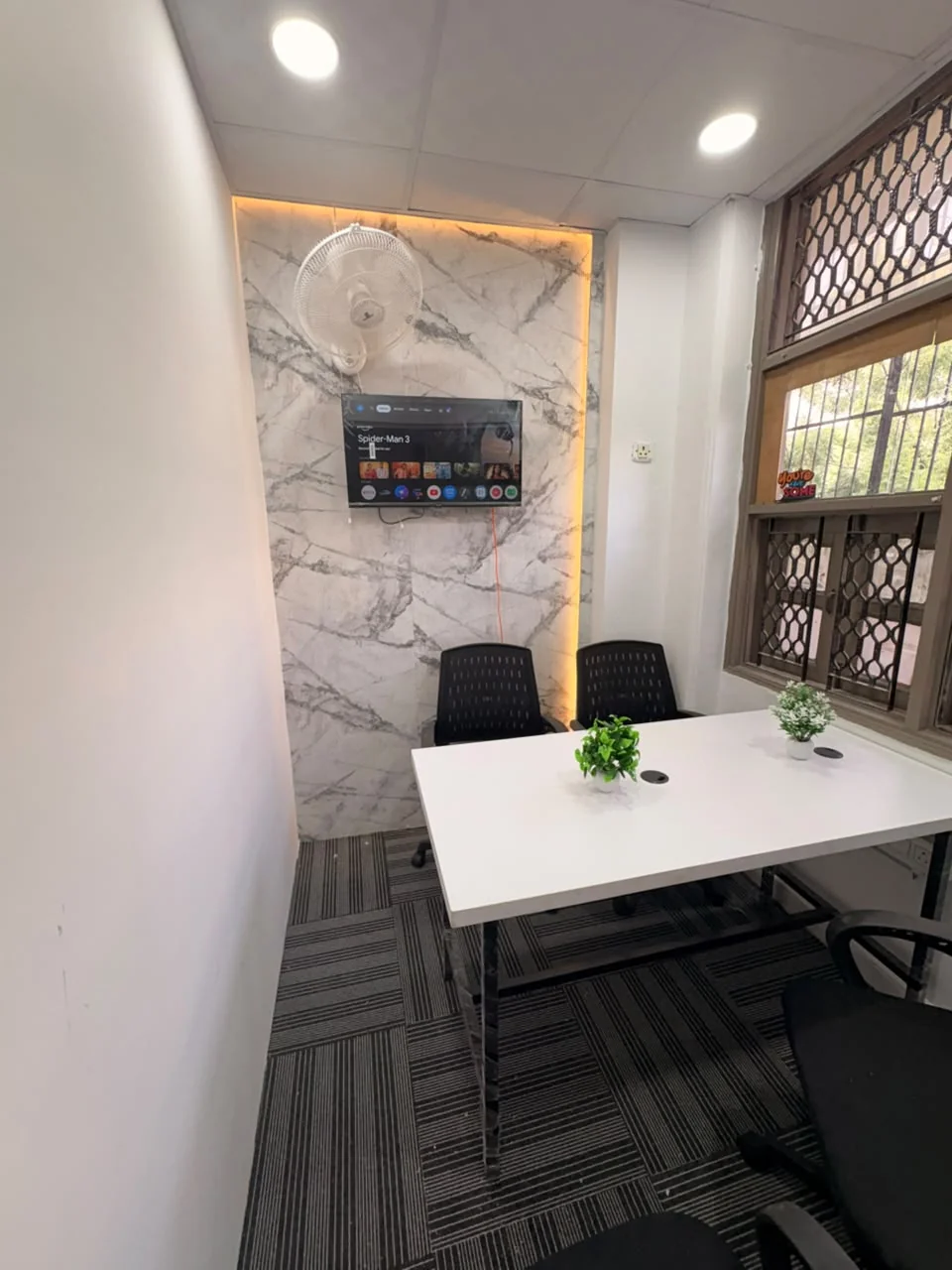
A meeting room booking is more than a date and a starting time. The room needs to fit the people, support the conversation and be available for the full session. Dansa has one six-person meeting room in Sector 7, Rohini, listed at ₹400 per hour. This guide helps you send a useful request and avoid leaving practical details until the attendees arrive.
Count everyone who needs a seat
Include the organiser, guests, colleagues and anyone joining in person for only part of the session. The room accommodates up to six people. Do not book for six and assume the organiser can be added afterwards. If the attendee count changes, tell the team before the meeting so suitability can be confirmed again.
This is an hourly meeting room, not a six-person monthly private cabin. The workspace’s team-office option is a separate four-person cabin. Choose the meeting room for a defined session such as a discussion, review or interview, and explain the activity when requesting it. Particular privacy, recording or acoustic requirements should be discussed rather than assumed from the fact that the room is enclosed.
Reserve the time you actually need
Allow for the activities you intend to do in the room, not just the formal agenda. Setting up a laptop, checking a connection and packing away may require time too. Ask how room access works before and after the booked slot; do not assume early entry or an automatic extension.
| Requested duration | Regular room-hire calculation |
|---|---|
| 1 hour | ₹400 |
| 2 hours | ₹800 |
| 3 hours | ₹1,200 |
| 4 hours | ₹1,600 |
These calculations use the listed hourly rate before any applicable taxes, confirmed extras or agreed offer. They are not live quotes or availability confirmations. Ask how extensions, rescheduling and cancellation are handled before paying. The meeting-room page is the direct starting point for your request.
Confirm the equipment, even when you see a screen
Tell the team whether the meeting is in person, includes remote participants or requires a presentation. Explain what devices you will bring and ask which equipment is available for the booking. Do not assume a particular cable, adapter, camera, microphone, whiteboard or conferencing setup from a photograph.
For a remote call, check compatibility with the application and laptop you intend to use. A television or screen in an image is not a guarantee of a particular connection or audio arrangement. If the session is important, ask about a brief equipment check before the date. Bring the accessories that the team confirms you should provide. The objective is to know who supplies each part of the setup, rather than discover a missing item when the meeting begins.
Give guests the actual Rohini address
Dansa is at First Floor, 262, H-17, Sector 7, Rohini, New Delhi 110085, near Dr. Baba Saheb Ambedkar Hospital Metro Station (formerly known as Rohini West). Share the location page with attendees and ask the team for the current approach instructions. Parking is available nearby; confirm the station exit, walking route and parking arrangements relevant to your guests.
Ask about first-floor access in advance for anyone with a mobility requirement. Make sure visiting attendees know they are coming to Rohini, even if you originally searched for a room around Pitampura or elsewhere in North Delhi. The Pitampura comparison guide states that distinction clearly and can help when guests are planning from that area.
Separate room availability from standard workspace hours
Normal workspace access is 9 AM–8 PM, six days a week. Meeting-room sessions outside standard hours can be discussed with the team. Send the full date and time, including whether the meeting is early, late or on the usual closing day, and wait for confirmation.
Do not treat an out-of-hours request as automatically accepted because the website form allows a time to be entered. It is an enquiry field, not a live calendar. Ask which additional charges and access arrangements apply. A recurring late meeting should be discussed as a recurring requirement, not handled as a series of assumed extensions. Our access guide explains the questions that also matter outside a normal workday.
Check what membership credits cover
Meeting-room credits are available with workspace memberships, but the allocation varies by plan and must be confirmed. Ask how many credits or hours are included, which bookings qualify and how additional time is charged. Do not assume that a cabin membership gives unlimited exclusive use of the separate meeting room.
Availability still needs to be confirmed when credits are used. For a team with regular client sessions, tell us the expected frequency and duration while your workspace plan is being quoted. That makes it easier to compare the real routine. The team-office guide connects meeting use with the broader cabin decision.
Send a request that can be answered clearly
Include the date, start time, duration, total number of people, meeting purpose and equipment requirements. Add any visitor-access needs and say whether you hold a workspace membership. For a recurring meeting, list the pattern rather than only the first date. A clear brief helps the team respond with availability and a complete quote.
Use Book a meeting room to prepare the WhatsApp enquiry. You must send the message in WhatsApp; the site does not reserve the room or collect payment. Wait for the team to confirm the booking, and keep the agreed time, equipment and cancellation details with your meeting invitation. That is the useful difference between a room request and a meeting that is ready to run.
Workspace details and regular prices describe Dansa’s Rohini offering. Confirm current availability, your complete quote and the agreed terms with our team before booking.
Ask a question about this guide